


Contact our support team for more information.
Guardian provides two types of Administrators: Company Administrators and Project Administrators. The dual administrator levels allow for the proactive management of the project models to be delegated directly to people assigned to the project.
Two roles provide delegated day-to-day model control to the people on each model while keeping firmwide standards with a smaller group.
Every administrator, of either role, must first be added on the Administrators tab of Company Settings. This tab lists all administrator licenses on your Guardian account.
Note: The company’s first Company Administrator is assigned by the Guardian team when the account is created.
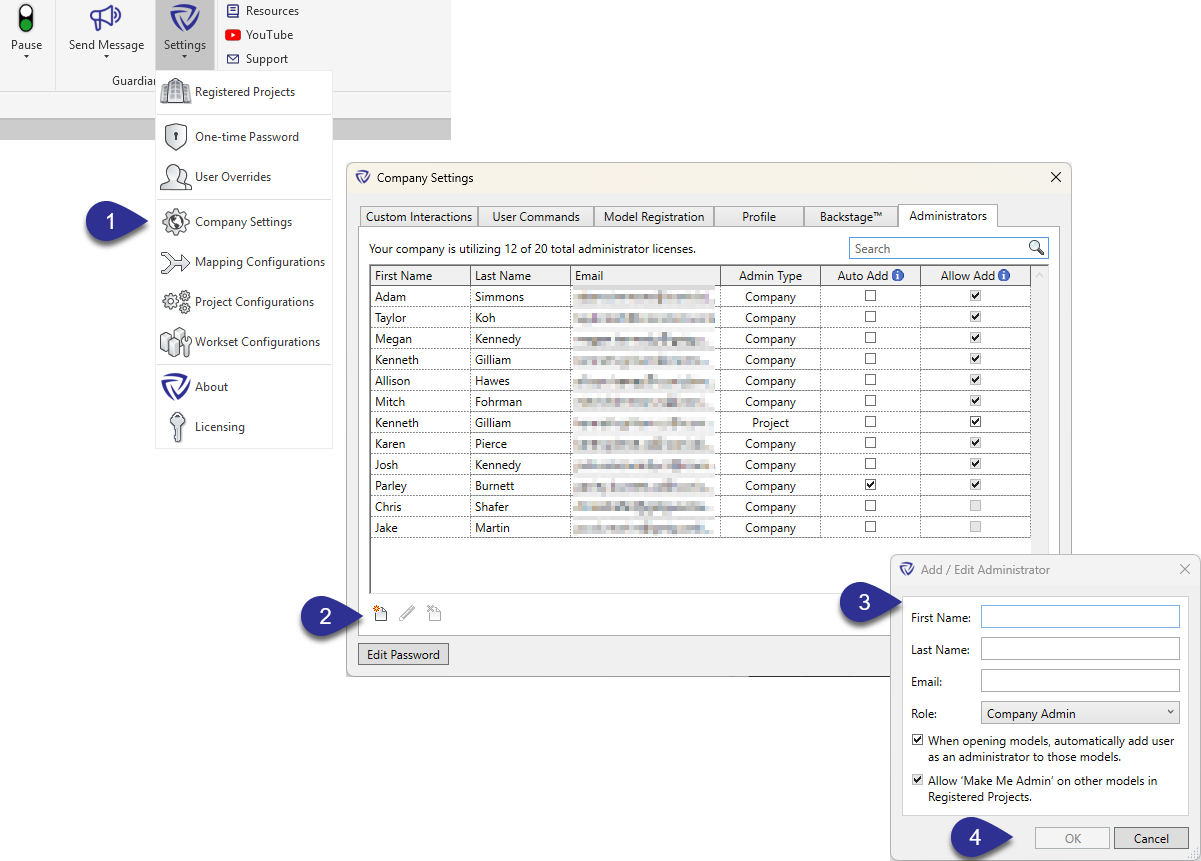
Company Administrators can always add themselves to any project, whatever these options say.
Assign administrators to registered models in the Registered Projects dialog.
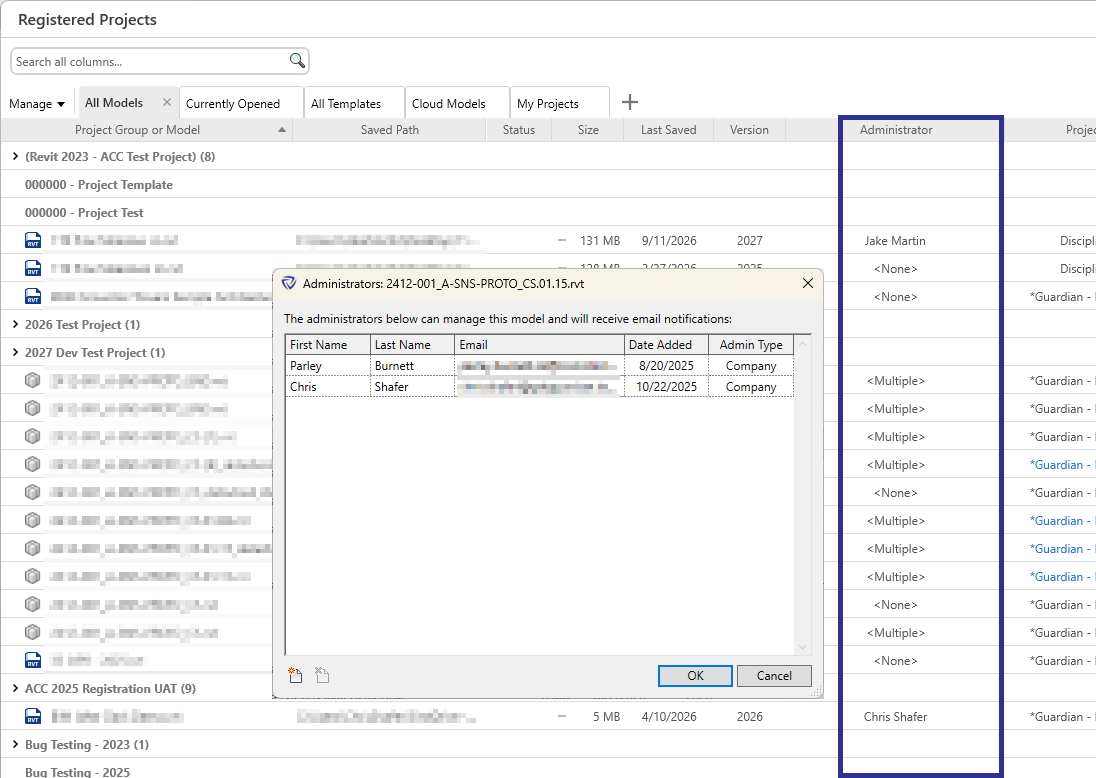
Tip: Hold Ctrl and click to select several models, then edit their administrators at once.
A Company Administrator who isn't assigned to a model won't get its instant alerts, unless the model has no admin at all.
If your firm uses only a few admin licenses, uncheck Auto Add for each admin on the Administrators tab. Models then stay unassigned until you assign someone, and Guardian sends unassigned model alerts to every admin. That keeps everyone informed about every registered model.
In beta
Guardian Link lets one company, the Primary Project Team, keep its Guardian standards and protections in force on a model while other companies, Linked Collaborators, work in it. Guardian Link doesn’t add new roles or permissions. It changes where each company’s administrators can act.
On the Primary’s model, a Linked Collaborator’s Company Administrators and Project Administrators are treated like regular users for anything the Primary owns:
A Prevent prompt accepts two kinds of password, and on a Linked model they don’t always come from the same company:
So a Linked Collaborator user stopped by one of the Primary’s project protections can get past it with either the Primary’s override password or an OTP from their own company. An OTP generated by a Primary administrator won’t work for them.
This will change at general availability.
The split above is how One-Time Passwords work during the Guardian Link beta. At general availability, only the Primary’s passwords will work on the Primary’s models, for every user in the Link.
Contact our support team for more information.
Guardian provides two types of Administrators: Company Administrators and Project Administrators. The dual administrator levels allow for the proactive management of the project models to be delegated directly to people assigned to the project.
Two roles provide delegated day-to-day model control to the people on each model while keeping firmwide standards with a smaller group.
Every administrator, of either role, must first be added on the Administrators tab of Company Settings. This tab lists all administrator licenses on your Guardian account.
Note: The company’s first Company Administrator is assigned by the Guardian team when the account is created.
Company Administrators can always add themselves to any project, whatever these options say.
Assign administrators to registered models in the Registered Projects dialog.
Tip: Hold Ctrl and click to select several models, then edit their administrators at once.
A Company Administrator who isn't assigned to a model won't get its instant alerts, unless the model has no admin at all.
If your firm uses only a few admin licenses, uncheck Auto Add for each admin on the Administrators tab. Models then stay unassigned until you assign someone, and Guardian sends unassigned model alerts to every admin. That keeps everyone informed about every registered model.
In beta
Guardian Link lets one company, the Primary Project Team, keep its Guardian standards and protections in force on a model while other companies, Linked Collaborators, work in it. Guardian Link doesn’t add new roles or permissions. It changes where each company’s administrators can act.
On the Primary’s model, a Linked Collaborator’s Company Administrators and Project Administrators are treated like regular users for anything the Primary owns:
A Prevent prompt accepts two kinds of password, and on a Linked model they don’t always come from the same company:
So a Linked Collaborator user stopped by one of the Primary’s project protections can get past it with either the Primary’s override password or an OTP from their own company. An OTP generated by a Primary administrator won’t work for them.
This will change at general availability.
The split above is how One-Time Passwords work during the Guardian Link beta. At general availability, only the Primary’s passwords will work on the Primary’s models, for every user in the Link.
Contact our support team to receive personalized assistance.
